BAAS Docs
Documentation for the BAAS Tauri desktop client, scheduler, feature configuration, remote emulator display, updater, and web Wiki.
 Blue Archive Auto Script
Quick Start
BAAS Tauri is the BAAS desktop workbench. The desktop client coordinates profiles, scheduling, logs, remote display, updates, and documentation, while the backend handles ADB, screenshots, recognition, task execution, and state synchronization.
First Run
Download the client, start the backend, initialize the key, and validate the first connection.
Android Client
Install the APK, enable accessibility, keep the foreground service, and use notification script toggles.
Understand the UI
Learn the home page, sidebar, profiles, logs, remote display, and context menu.
Automate Safely
Configure task state, next run time, prerequisites, and low-risk validation order.
Feature Configuration
Server, emulator, script, stages, sweeps, cafe, shop, crafting, and combat are documented separately.
Start Here
BAAS is split into orchestration and execution: the desktop client coordinates, while the backend performs device control and automation. When something goes wrong, inspect profiles, scheduler state, ADB, recognition, and logs first.
Download BAAS Tauri
Download BAAS Tauri
The recommended package is selected from your system. You can switch OS and package type manually.
Loading latest release...
⚠️ macOS Requires Manual Approval
BAAS Tauri macOS packages are not Apple-notarized. If macOS says the developer cannot be verified, the app is damaged, or the app should be moved to Trash, confirm that the file came from official GitHub Releases first, then follow the macOS notes in Installation and Connection.
Interface Preview
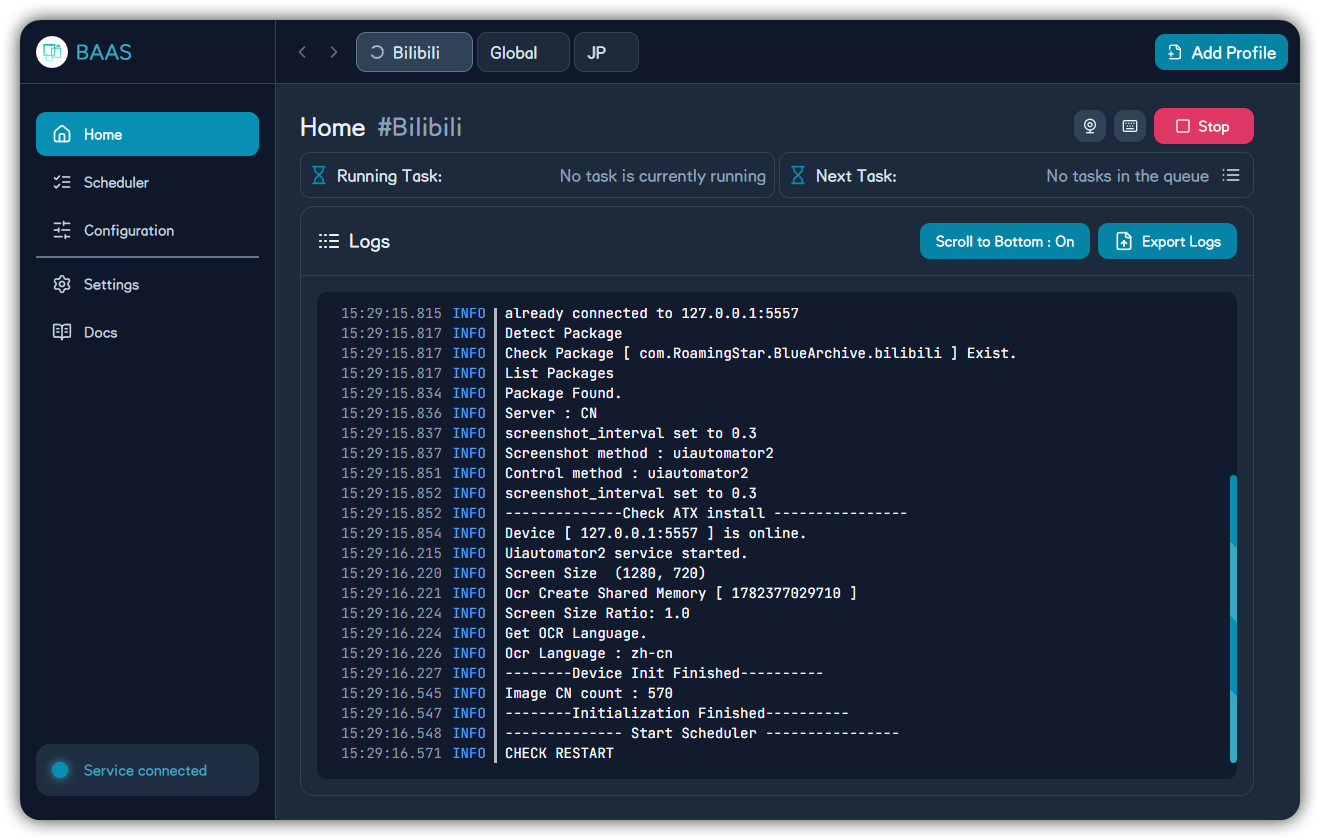
BAAS Tauri Home: navigation, profile shortcuts, task status, logs, and run controls.
🧭 Entry PointsHome, Scheduler, Configuration, Settings, and Docs.
🧩 ProfilesSeparate accounts, servers, emulators, and strategies.
🧪 ValidationStart with low-risk tasks before resource-spending tasks.
📚 LanguagesOnly Chinese and English are maintained.
Reading Path
| Scenario | Read First | Confirm |
|---|---|---|
| First installation | Installation and Connection | Backend started, key accepted, service connected |
| Android client | Android Client | APK, permissions, foreground service, toggle |
| First main-window use | Interface Overview | Profiles, logs, remote display, sidebar |
| Daily automation | Scheduler | Enabled tasks, next run time, dependencies |
| Feature setup | Individual feature pages below | Resource cost and validation method |
| Something broke | Troubleshooting | Logs, screenshots, profile, server, emulator |
| Release changes | Release History | Affected areas and upgrade notes |
Feature Configuration
Profiles
Create, copy, import, export, and remove profiles.Home Runtime
Start, stop, queue, logs, assets, and remote display.Server
CN, Global, JP, and server-specific behavior.Emulator
Executable path, launch delay, multi-instance, and ADB.Script
Backend launch options, screenshot method, and control method.PC Client
Steam Global, JP PC, HDR, window ratio, and desktop control.Stages
Normal, hard, story, and event stages.Sweeps
Daily maps, commissions, scrimmage, events, and tickets.Teams
Sidebar order, preset teams, and attack-type teams.Cafe
Invite students, collect rewards, and handle cafe actions.Lessons
Areas, tickets, priority, and lesson sweep strategy.Shop
Normal, arena, raid, expert permit, and other shops.Crafting
Node choices, material input, and result collection.Combat
Arena, Total Assault, Joint Drill, and high-risk combat tasks.Maintenance
Friends, notifications, launch game, rewards, and helper tasks.System Settings
Theme, language, zoom, background, remote display, and hotkeys.Updates
Backend updates, client updates, mirrors, channels, and SHA tests.Installer Config
setup.toml, MirrorC CDK, update sources, and backend install options.Backend Service
HTTP, WebSocket, auth, config sync, and remote-display interfaces.Auto Fight Dev
Workflows, state machines, template matching, OCR, and assets.Maintenance Model
The old local Wiki is no longer the primary documentation surface. The canonical source is baas-tauri/docs, generated by Fumadocs. The Tauri Docs page loads this web documentation site by default and can detach it into a standalone "Wiki Documentation" window.