
Reporting Issues and Uninstalling
Prepare logs, screenshots, profile information, reproduction steps, and uninstall BAAS cleanly.
When reporting an issue, the goal is not to describe a feeling; it is to help maintainers locate the failing layer: Tauri client, backend service, ADB/emulator, screenshot recognition, task logic, scheduler, or update source.
Check Before Reporting
Before opening an issue or asking for help, confirm:
| Check | Notes |
|---|---|
| Version | Client and backend are up to date |
| Configuration | Emulator, server, screenshot method, and control method match the docs |
| Reproduction | The issue is repeatable or its pattern is clear |
| Logs | Full logs are preserved, not only the final line |
| Screenshots | Game screen, config dialog, and BAAS logs are included |
| Risk | Resource-spending tasks are stopped |
What to Provide
| Issue Type | Required Material |
|---|---|
| Stuck on a page | 1280x720 game screenshot, BAAS logs, task name |
| Stage route stuck | Screen recording from task start to stuck point, with game and logs visible |
| Configured task did not run | Feature config screenshot, scheduler screenshot, logs |
| Unconfigured task ran | Current profile, queue, scheduler settings, logs |
| ADB cannot connect | Emulator type, ADB port, detection result, backend logs |
| Update failed | Update source, SHA test result, installer logs |
Screenshot guidance
Prefer lossless PNG for game screenshots. For recordings, keep the game window and BAAS logs visible together.
Locate Profile Files
Backend profiles usually live under the backend install directory's config folder. Each subdirectory maps to a profile; config.json contains the name shown in the UI.
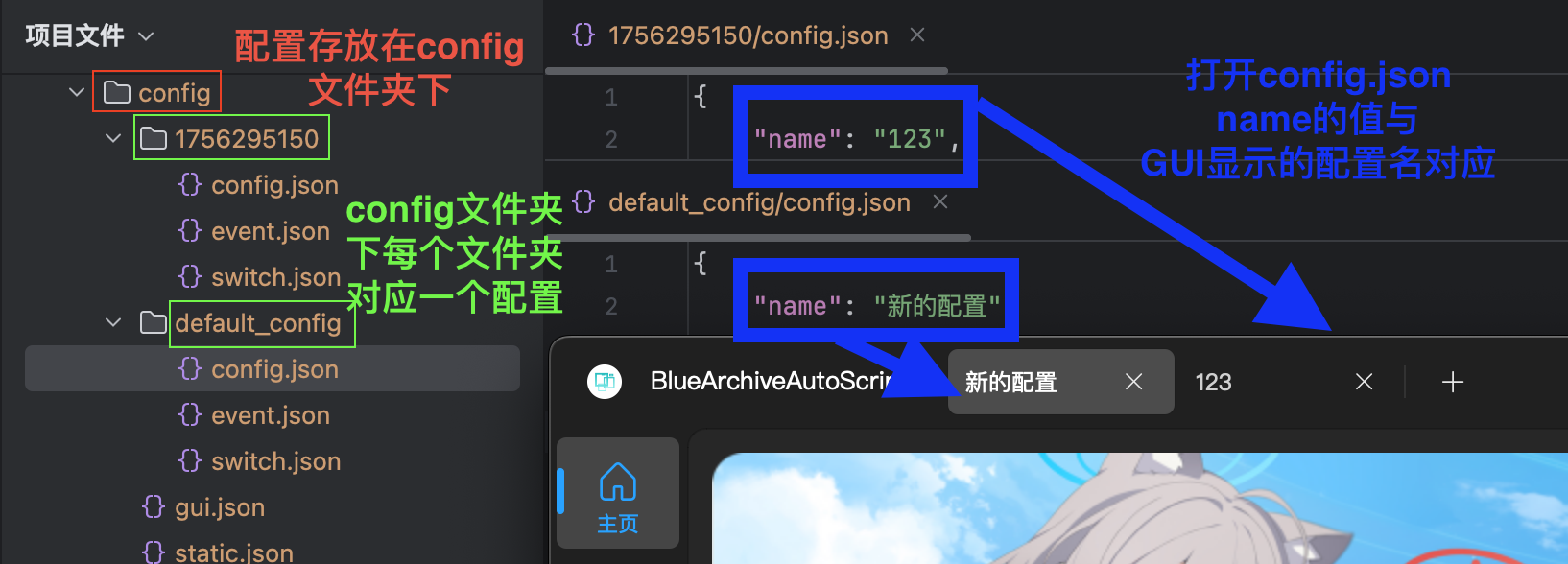
The current Tauri client should use profile export when possible. Export a .zip, then review it for secrets before sharing.
Privacy and Safety
Do not publish:
- BAAS key.
- MirrorC CDK.
- Private repository, proxy, or acceleration source.
- Local usernames or paths you do not want public.
- Sensitive game account details.
If maintainers need a profile, send it privately and include the task name plus reproduction steps.
Uninstall
BAAS has two parts:
| Part | Uninstall Method |
|---|---|
| Tauri client | Use the system app uninstaller, or delete the portable directory |
| BAAS backend directory | Stop backend and ADB processes, then delete the backend install directory |
If the backend directory cannot be removed:
- Close BAAS Tauri.
- Open Task Manager.
- End remaining
python.exe,adb.exe, and emulator-related processes. - Delete the backend install directory again.
For migration to another computer, prefer profile export/import. Copying the whole backend directory can work but also carries local paths, runtime files, and cache.